Broadband One

  • Data services
  • Wholesale

Place orders for Broadband One from your systems to The Hub.

Broadband One is managed internet access meeting your customers’ increasing bandwidth demands, with ultra-fast speeds of up to 1Gbps and access technologies including FTTP and SOGEA.

Integrating order and service management with your business applications reduces cost to serve, and increases customer satisfaction.

APIs included

BT

OAuth 2

Identity and Authentication

OAuth 2 produces an access token which is required to authorise API calls for a given app.

Product Documentation
BT Wholesale

Address Management

Broadband
Voice

Search the Rest of BT (RoBT) and Openreach address databases to find address records and keys to be used in orders. Where no suitable matching address is found, create an address and obtain a temporary address key.

Product Documentation
BT Wholesale

Product And Network Availability

Broadband

Determine the services available at customer's location and the status of the existing installed services.

Product Documentation
BT Wholesale

Appointment Management

Broadband

List available engineering appointments and reserve an engineering visit.

Product Documentation
BT Wholesale

Order Management And Progress Updates

Broadband

Submit, amend or cancel an order, and receive notifications about the order status. This API is based on TMF622.

Product Documentation
BT Wholesale

Service Test Management

Broadband

Diagnostics troubleshooting Broadband One problems.

Product Documentation

We've documented tutorials for every Broadband One order type, including Modify (upgrading your Broadband One customers).

Choose an API above to explore its technical documentation and deep-dive API-specific tutorials.

Want a hands-on start? Our sandbox tutorials walk you through the most common order journeys, new lines, migrations, takeovers, reactivations, and full-fibre orders, using real API calls in the sandbox from start to finish.

How it works

This diagram shows a Broadband One order. View a larger version by clicking it.
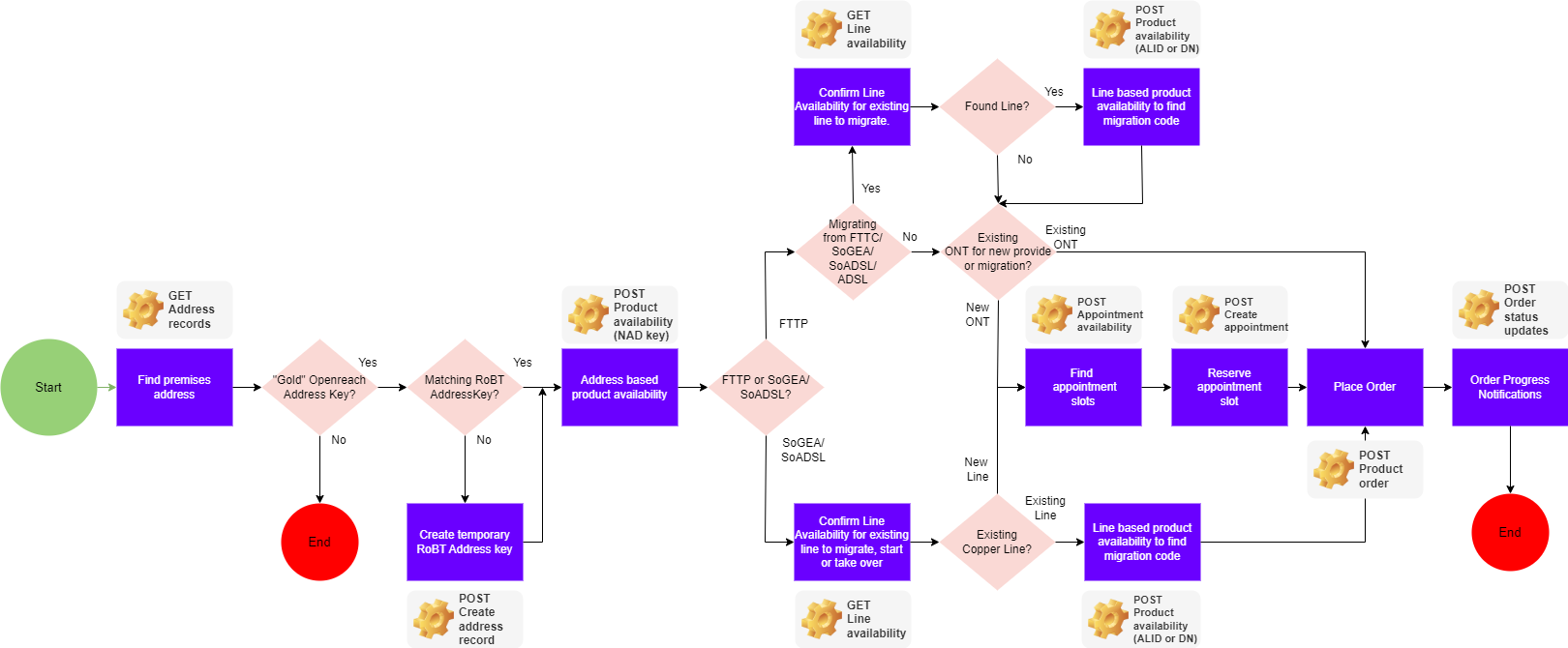
API Order Journey


The following process, and diagram above, describe a Broadband One Provide order (new customer).

  1. Get access token.

    Authenticate using an OAuth 2.0 bearer token. Use this token in the Authorization header for all subsequent requests.
     

  2. Identify Openreach and BT (ROBT) Network Address Database (NAD) keys for the end user's premises: GET Address records.
    • A 'Gold' Openreach NAD key is essential.
    • If a matching ROBT NAD key cannot be found, it can be generated using POST Create address record.
       
  3. Identify Broadband One access technologies and speeds: POST Product availability.
    • Where fibre is available, the response payload also shows FTTP infrastructure.
    • If copper broadband is required, a line check is requested (GET Line availability) to see if supporting infrastructure is available.
       
  4. Reserve an engineer appointment (POST Appointment availability, then POST Create appointment) when required for:
    • Managed installs (e.g., FTTP requiring a new ONT).
    • Copper broadband without an active, compatible line.
       
  5. Create the order:POST Product order.

    To receive progress updates (KSUs).

Getting started

  1. Register for API access (you must be a BT Wholesale customer).

    Need help? Learn how to register to the portal.

     
  2. Log in, and click Dashboard to create an app.

    Need help? Learn how to create apps and where to find your credentials.

     
  3. Explore the API reference documentation.

     
  4. Try out the code using our Broadband One Postman Collection, or complete the end-to-end sandbox or deep-dive API-specific tutorials.

Try it: Place a test order using our Sandbox


These sandbox tutorials walk you through placing a Broadband One order end-to-end using the BT Wholesale TMF APIs, from a new SOGEA line to migrating, taking over, or reactivating an existing one, and a full-fibre FTTP order. Select the journey that matches what you want to test.

Place a SOGEA broadband order

In this end-to-end sandbox walkthrough, you'll order SOGEA 80/20M with a router, at a fixed test address.
 

Sandbox tutorial

Place a SOGEA Migration-in order

In this end-to-end sandbox walkthrough, you'll migrate an existing SOGEA line to a new SOGEA 40/10M line with a router, at a fixed test address.

Sandbox tutorial

Place a SOGEA Working Line Take Over (WLTO) order

In this end-to-end sandbox walkthrough, you'll take over an existing WLR/PSTN line and convert it to a new SOGEA 40/10M line with a router, with no number export required, at a fixed test address.

Sandbox tutorial

Place a SOGEA Start on Stopped Line (SOSL) order

In this walkthrough, you'll reactivate an existing stopped MPF line as a new SOGEA 40/10M  line without a router, with no number export required, at a fixed test address.

Sandbox tutorial

Place an FTTP broadband order                                             

In this end-to-end sandbox walkthrough, you'll order FTTP 40/10M with a router, at a fixed test address.


Sandbox tutorial

Benefits and features

  • Deliver a truly digital order experience for you and your end customer
  • Reduced order management costs and manual order entry errors
  • Reduced time to order
  • Place and manage orders faster
  • Place and manage orders programmatically, saving time and money
  • Validate customers' address details and match to a single unique address key or create a new temporary key to facilitate delivery of service to the correct customer location
  • Check availability of appointment slots based on particular dates and book an engineer appointment
BB1 Image

Help and support

Have questions? 

Explore our Knowledge Centre. Find "how-to" guides to walk you through setup and app creation, visit the troubleshooting section to resolve common errors, and get quick answers in our FAQ.

Knowledge Centre

Unfamiliar with a term?

Our glossary defines the key technical terms and acronyms used across the developer portal. 

Glossary

Are you new to BT Wholesale or already a customer?

Choose an option to explore Broadband One product details or log in to access full API documentation and integration support.

Back to top